Adventures in browser security
Chrome’s multi-process architecture permeates its extension system, so Chrome extensions end up as distributed systems running inside a distributed system. A case study in how fast that gets complicated.
Episode 1: “A distributed system in your browser”#
Chrome is famous for its multi-process architecture. Heck, they even made a comic book about it. Multi-process applications, like Chrome, more closely resemble distributed systems running in datacenters than they do traditional single-process desktop applications. Each process in Chrome can (and should) be thought about as a node in a distributed system. They communicate via an IPC channel abstraction and have several axes (often dictated by the functionality of the process) that should be scaled or tweaked independently. Whether it be memory, cpu, network and disk I/O, the impact of a security exploit1, or the blast radius of a single component failure; each process has different constraints that need to be satisfied and different properties that affect its design and scope. Having the option to separate things into separate processes (or to merge things in to a shared process) gives you more knobs to turn when architecting the components of your application.
Want tabs that won’t take down each other should one crash? Have multiple renderers2! GPU accelerated rendering allocates a lot of memory and is hard to make secure? Keep it in a single process and sandbox it!
Process isolation really can buy you a lot3.
I won’t go into too much detail about Chrome’s architecture, but I will add that Chrome has more than just a shared browser process and multiple renderer processes. It also maintains a dedicated GPU process, a process per native plugin type, and an extensions process for running parts of chrome extensions.
“This history lesson is great and all, but you titled this blog post ‘A distributed system IN your browser’, not ‘Your browser IS a distributed system’.”
I know, and your body IS a wonderland. But I gave a bit of background about Chrome’s design because it is necessary context for what I really wanted to talk about -> Why Chrome extensions, built in a secure distributed environment like Chrome, are often really complicated.
No really, I meant IN your browser#
Chrome’s multi-process architecture has, naturally, permeated the design of the Chrome extension system. Most Chrome extensions running in Chrome have components that are distributed across several processes. The Chrome extensions themselves end up sprouting architectures that strongly resemble the environment that it they are running in. That is, they themselves start looking like distributed systems, with each isolated piece of the extension resembling a mini server.
It’s a distributed system in a distributed system.

Chrome content scripts run in-process with regular web pages. Chrome background pages, options pages and popups run in the extensions process. Each piece of a chrome extension must communicate with the others using message passing. The same wondrous multi-process architecture that affords so much in Chrome itself has a dark side. It means your Chrome extensions end up having more moving parts, and when these moving parts need to talk to each other, with varying rules about who they can talk to and how they can talk, you end up with complexity proportional to the cross product of all the communicating parts of your system.
Don’t get me wrong. The Chrome extension devs did a great job. The extensions system has been carefully and thoughtfully designed over the years.
I’m just saying stuff gets complicated. And it gets complicated real fast.
A case study: PostMessage into an iframe#
Chrome extensions try to protect themselves from malicious web pages by forcing Javascript context isolation using Isolated Worlds from V8. This means that you cannot make direct method invocations between a Chrome content script and Javascript running in some target webpage, or share direct object references.
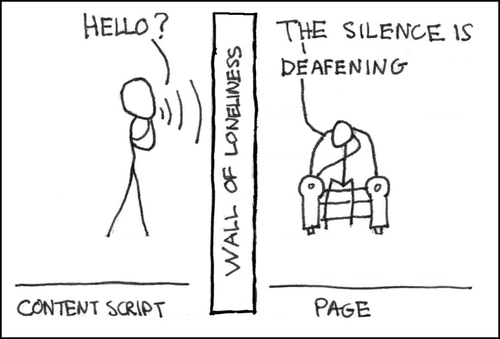
Mr. Munroe. Please forgive me for copying (and butchering) your medium. I know my XKCD-style stick figure illustrations are crappy, but personification really is the best way to think about distributed systems4. I don’t know if it’s so bad it’s good. But I like them :).
Anyways. Isolated worlds make sense for the most part. They keep malicious web pages from getting all naughty with your legit, non-malicious installed extensions. However they make certain things really hard to do in Chrome extensions. Here’s the code one would expect to write for directly communicating with an iframe, injected by a content script, via postMessage().
var frame = document.createElement("iframe");
frame.src="https://<the mothership's domain>/inner.html";

frame.onload = function() {
  // If this is a Chrome content script, contentWindow is offlimits.
  frame.contentWindow.postMessage("A Message!", "https://<the mothership's domain>");
}

document.body.appendChild(frame);
(originally published as a gist)
Except it doesn’t work5. The above example is something that is technically forbidden, since it means obtaining a reference to the iframe’s contentWindow from the content script.
“But why are you injecting an iframe in the target page to begin with? Surely you are doing it wrong.”
Without going into too much detail, there are perfectly valid use cases outside of simple cross domain communication (which Chrome extensions already have affordances for). For one, iframes can act as a barrier to protect any UI you might want to inject into a target page from the page’s CSS. Also, if your extension has any significant interop with a remote web service, they can be used for remote loading keys/codecs/whatever so that you can establish secure communication with the mothership. Not to mention the deployment model of stuff-in-an-iframe means you can deploy pieces of your extension that have a tight coupling with a regularly changing server, outside of the slower and less predictable extension publish/update mechanism, which requires a trip through the Chrome extension web store.
Back to the code sample. As a result of the barrier between your content script and the useful API on contentWindow, the only way to talk to your iframe is by cooperating with code running in the JS context of the host page, asking it to do the postMessage() call for you. That is, proxy messages from the content script, through some code in the web page’s JS context, so that you can postMessage() into the iframe.
But… what code are we cooperating with?
If your content script and iframe are running on a page that you do not control, you will need to inject script dynamically, that will act as your message proxy. You can do this by appending a <script> tag whose src is pointed at a file hosted either in your extension, or remotely.
Once you have some code that is willing to work with your content script running in the page, you can finally arrange to talk to the iframe. The encouraged mechanism for communication between code running in an extensions context and code running in a webpage, is through the DOM via custom event dispatches. You can also use window.postMessage(), but if you are working with a page you don’t control, you might have problems since it could confuse any message handlers that the page may have already wired up.

As you can see, things are starting to get messy. And we haven’t even begun to talk out of process yet! Let’s keep going.
Now, loading a script remotely to cooperate with your Chrome extension only works if the page you are injecting your script into does not set an explicit Content-Security-Policy (CSP) directive. If they do set a CSP directive, chances are you will be forbidden from using eval() or loading scripts from domains not listed in the directive. So your nice proxy script is dead in the water. We will need to get more creative.
One solution is to employ a background page, and another content script configured to run inside your iframe (more nodes in your distributed sys… I mean Chrome extension). We also need to invent a message passing protocol that uses the background page as a proxy for messages from the outer content script, to the inner content script. It is at this point that you almost forget what it was you were trying to do in the beginning. I think we said something about sending a single message from a content script, to the contents of an iframe, but I can’t remember. The system diagram for doing this now exceeds the complexity of system diagrams for most production web services.
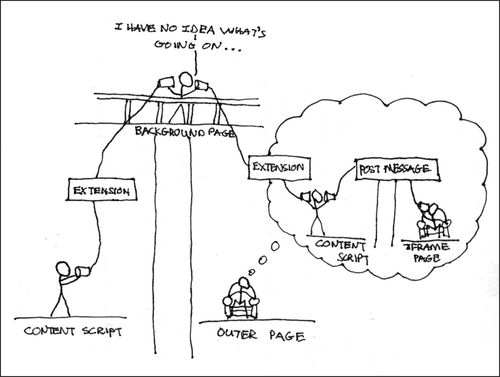
The rabbit hole goes a bit deeper. But that is a story for my next post :).
Edit (March 7, 2013): Some expanded discussion going on G+ about this post.
Notes#
-
Process isolation, coupled with process sandboxing is a powerful security technique for limiting the scope of an exploit. But it isn’t foolproof, as shown by these dizzyingly sophisticated attacks. ↩︎
-
Chrome has different process models, and can swap between them. But for the most part, tabs/renderers get their own process. Also, because of the design of V8 (that makes extensive use of static state), renderers that share the same process, do in fact share the same UI thread, and thus can block each other. ↩︎
-
Process isolation also has some drawbacks. It tends to consume more memory in aggregate, and can make certain operations slower by introducing an out of process call versus a simple function invocation. ↩︎
-
See the Actor Model. ↩︎
-
You should in principle be able to return a reference to something from contentWindow that behaves like the isolated global object available to the content script, but that doesn’t seem to be the case currently. As of Chrome 24, you couldn’t even get a reference to the contentWindow of an iframe from a content script at all. But as of Chrome 25, you can, but you get some nasty security warning splooge in the console when you try to call postMessage. It actually seems like a bug that this works at all, so I don’t encourage depending on it. I did a little digging, and I think it was an accidental side effect of this commit aimed at unblocking some Chrome OS work. ↩︎